Rich video metadata
Container basics, video track (resolution, FPS, codec, bitrate, rotation, PAR/DAR), color & HDR, audio tracks, and container metadata such as title or author when available.
Inspect codecs, resolution, HDR, audio, and EXIF-style image fields on your device. Build a personal catalog with search, notes, and optional file actions—offline-first.
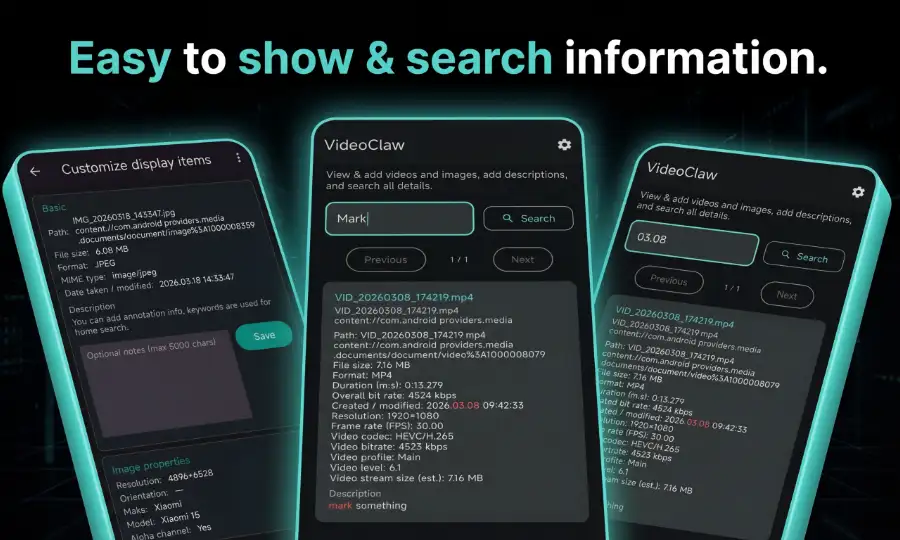
Everything from intro.md, in one app-shaped workflow
Add videos and photos from your library and browse rich technical details in one place. Paginate results, search descriptions, and choose which fields appear on detail screens.
Container basics, video track (resolution, FPS, codec, bitrate, rotation, PAR/DAR), color & HDR, audio tracks, and container metadata such as title or author when available.
Dimensions, MIME type, orientation, camera make/model, color space, alpha channel, and key dates—aligned with how the app groups image properties.
Keep a local list ordered by recent updates, full-text style search across indexed content and your notes (up to 5,000 characters per item), with paged browsing.
What you get in the product today
Workflow details that matter day to day
Paginate long libraries, search your own notes, and tune the inspector UI to the fields you actually need.
Move through catalogs in fixed page sizes so long libraries stay manageable on phone screens.
Query indexed technical fields together with optional descriptions you attach to each item.
Inspect color standard, transfer, range, static HDR metadata, and HDR10+ flags alongside classic video stats.
Oriented around media you add; settings surface privacy policy, feedback, and version information.
Decide which metadata rows appear for videos versus images so power users and minimalists both feel at home.
Uses photo and video media permissions aligned with current Android versions, with sensible fallbacks on older APIs.
SEO-friendly context for searchers
If you look for video metadata, media info, codec details, HDR10+, or EXIF-style image inspection on Android, MediaClaw concentrates those signals in a catalog you control, with search across notes and technical fields alike.
Keywords such as MediaClaw, offline inspector, Android HDR, and file organizer describe the same product experience: deep metadata, optional file actions, and a UI you can simplify field by field.
Before you share, edit, or debug a clip
Confirm specs locally, attach context with notes, and keep a curated list of the files you care about—without sending media to a server to learn what is inside.
Install from Google Play to start inspecting the videos and images you choose—metadata, search, notes, and optional file tools on your Android device.
Android · Google Play · Listing may appear as VideoInfo with the same package ID